The tasks that matter most — scheduled before you're too depleted to do them.
Your transcripts, your action items, your calendar — no bot required.
No account needed to try · 14-day unlimited trial · No credit card
By 3pm you have a dozen action items and zero time.
Action items pile up in transcripts, notes, and sticky tabs — but nothing connects them to when you actually have the time and energy to do the work. By the third meeting of the day, you've got a dozen new things on the list and no capacity for any of them. The next morning the cycle resets with a fresh pile.
And the back-to-back meetings burn the focus you'd need to execute. By afternoon you're multitasking, half-listening, pushing real work to late afternoon when you're depleted — or punting to tomorrow, where it competes with the next round of meetings.
It isn't a time-management problem. It's an energy and capacity problem, and no calendar app, task list, or AI notetaker on its own solves it.
TimeCompass ingests your existing transcripts — no bot required — extracts the action items, and schedules them when you actually have the energy to execute.
Why I built TimeCompass
I built TimeCompass because I kept losing the second half of my own workday to meetings I'd already had.
By early afternoon I'd have a dozen action items scattered across notes, memory, and half-written follow-up emails — and not much energy left to actually do any of them. Every tool I tried either scheduled my calendar or captured my meetings. Nothing did both, and nothing accounted for the fact that by meeting six, I wasn't the same person who'd shown up at nine.
So I started building this for myself, in the hours around a full-time job, without a bot sitting in my meetings and without a company that could see everything I said in them.
TimeCompass is still early. I'm building it in the open, testing it with a small number of people who have the same problem, and I'd rather tell you that directly than pretend otherwise. If the transparency on this site — down to the code that governs what we store — matters to how you evaluate tools, that's not an accident. It's the same standard I'm holding myself to.
— Gerald Mann, Founder, Great View Labs
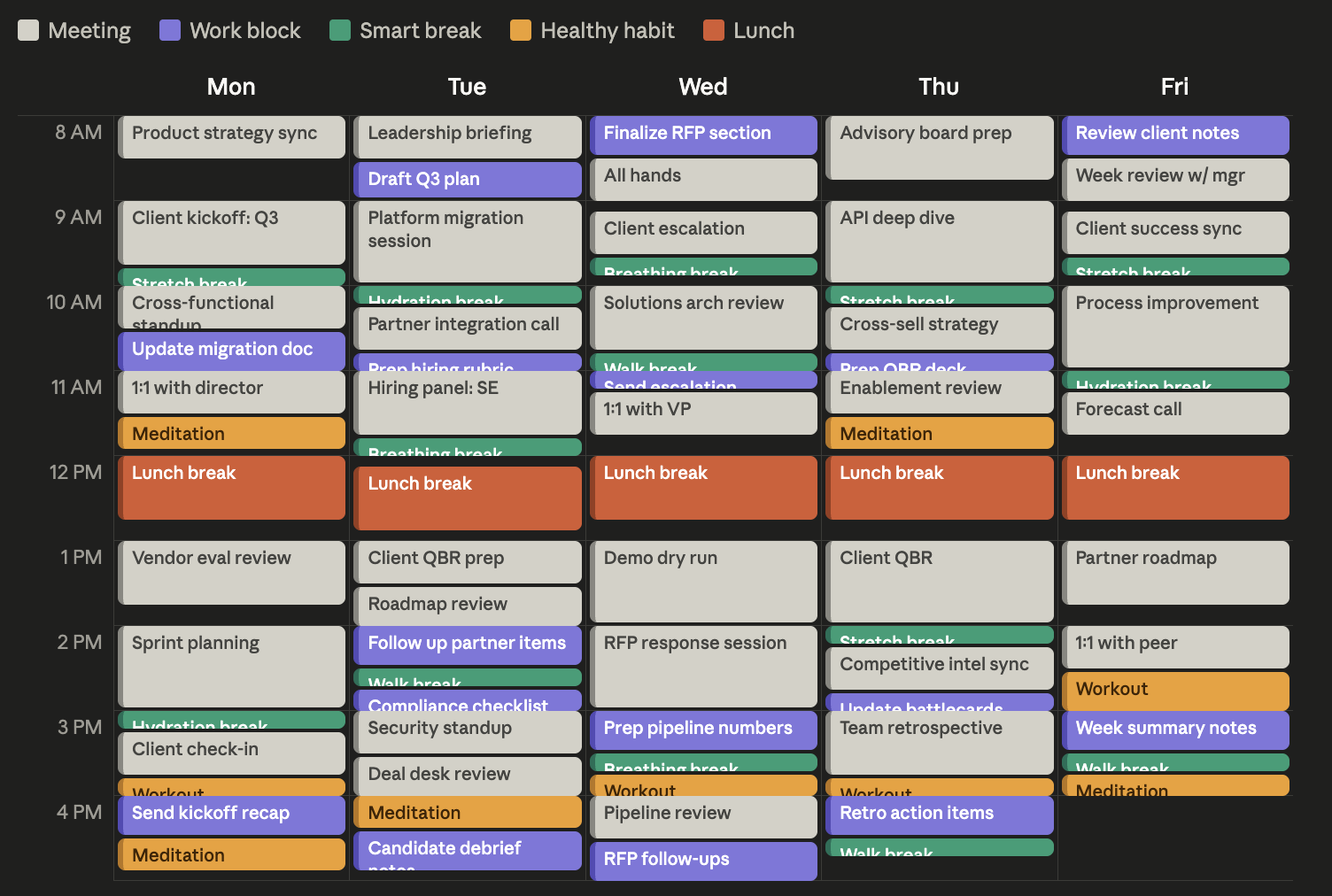
Here's what your week looks like with TimeCompass.
Meetings, the work that came out of those meetings, and the recovery time you need to actually do it — all on one calendar.
How it works
Get up and running in under two minutes.
Connect your calendar in 30s
One-click Google or Microsoft sign-in syncs all your calendars and meetings instantly.
Bring in a transcript
Paste it, forward it to your private TimeCompass address, or pull it from Google Meet, Teams, Zoom, or HeyPocket.
Tasks and recovery land on your calendar
We extract the decisions, rank them by priority, schedule each task around what's already on your day, and place recovery breaks based on your meeting load.
See it live in 30 seconds
No signup. No card. A working demo with sample meetings, tasks, and a fully scheduled calendar.
What's inside
The pieces that make the difference between captured tasks and finished work.
Recovery breaks built in
Breaks placed by your actual meeting load and energy curve — not on a fixed schedule.
Mindful scheduling modes
Deep-work blocks, no-meeting mornings, and energy-aware day shapes.
Daily and weekly briefings
A short morning brief and a Sunday review so you walk in already knowing what matters.
Connect to your tools
A public API and Zapier-friendly webhooks let TimeCompass push tasks back into Jira, Asana, Monday.com, or your team's tracker — so the work shows up where you already live.
How TimeCompass compares
The tools that schedule your day don't extract from meetings. The ones that extract don't schedule recovery. TimeCompass does both.
The real alternative most people use today isn't another productivity app. It's recording every meeting in Teams or Zoom, then copy-pasting the transcript into a notes doc later. Free, IT-approved, and exactly the workflow that already left you with a dozen open action items and no time to do them.
| Feature | Motion | Reclaim | TimeCompass |
|---|---|---|---|
| Extracts action items from meeting transcripts | |||
| Auto-schedules tasks around your calendar | |||
| Schedules recovery breaks based on meeting load | |||
| Works with any meeting source (Meet, Teams, Zoom, paste, email) | |||
| Defends focus time and habits | Partial | ||
| Works without storing your transcripts |
Motion's transcript extraction requires its own meeting bot to be invited to each call. TimeCompass works with transcripts from any source you already use — Google Meet, Teams, Zoom, HeyPocket, paste, or forwarded email. Comparison reflects publicly documented capabilities at the time of writing; competitor names belong to their respective owners.
Simple, transparent pricing
Start free. Upgrade when you're ready for unlimited.
Common questions
Product, scheduling, and what we do (and don't) keep from your meetings.
Your meetings aren't stored. Your trust is.
We process every transcript in memory, write a one-line summary, and discard the rest. No raw text ever lands in our database.
- We never store your meeting transcripts.
- Summaries are metadata only — duration, category, participant count. Never the content of the conversation.
- Your data is never used to train AI.
- Delete any meeting, any time, permanently.
The entire summary, in one sentence.
Every meeting we process becomes one of these shapes — duration, speaker count, and a single label drawn from a fixed vocabulary of 6. Rendered straight from the source code that runs in production.
"23-minute meeting with 3 speakers. Decisions made."concrete decision was finalized"47-minute meeting with 4 speakers. Follow-ups assigned."tasks with owners assigned for later"30-minute meeting with 5 speakers. Decision deferred."topic discussed but decision postponed"15-minute meeting with 6 speakers. Status update."one-way briefing or status share"60-minute meeting with 2 speakers. Working session."hands-on collaborative work"12-minute meeting with 4 speakers. No action items."discussion with no decisions or assignments"8-minute meeting with 2 speakers."fallback — AI couldn't confidently pick a label